Point Application Properties
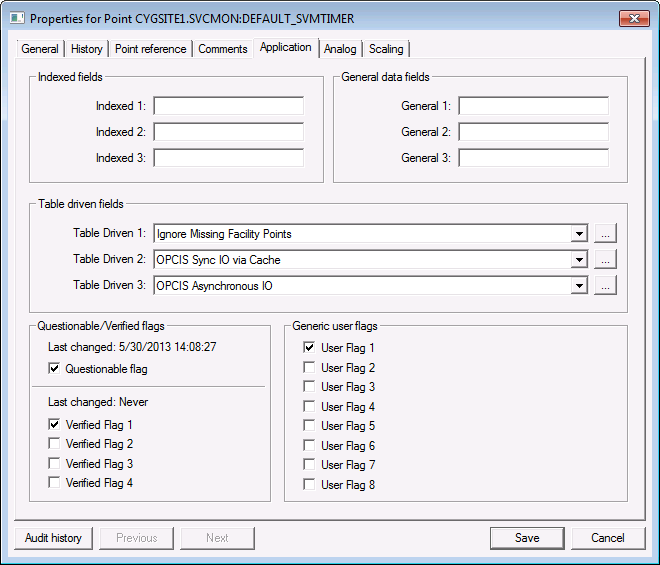
Use the Application page to configure application-specific properties for a particular point. For example, they may be used by Group rollup filter definitions, Facility points, or OPCIS points, or Service Monitoring Service points. If they are not serving an application-specific purpose, they can be used to store extra attributes.
The names of these properties, except the Questionable/Verified Flags, are user-configurable. Be aware that the property names are service-specific. That means that they apply to all records in the service. To change the names of the properties, right-click in the service pane and click Configure Attributes. See Setting Default Point Configuration for information about configuring default attributes and descriptions for the points attributes.
|
| Click the thumbnail to see a sample Application page for an Existing Point |
Application Properties
These are the properties shown on the Application page in the PNT Editor.
See Token Categories - Point: Application for the corresponding tokens for each property and Filter Attributes - Point: Application for the corresponding filter attributes for each property.
| Property | Description | Default Value |
|---|---|---|
| Indexed fields | ||
|
Indexed 1 |
Use the Indexed 1, Indexed 2, or Indexed 3 data field to specify a property that is included in a defined PNT index. The value can be free-form text up to a maximum of 15 characters. |
Blank |
|
Indexed 2 |
Blank |
|
|
Indexed 3 |
Blank |
|
| General data fields | ||
|
General 1 |
Use the General 1 data field to configure application-specific properties for a particular point. The value can be free-form text up to a maximum of 20 characters. Group Rollup Filter DefinitionUse the General 1 data field to specify a group rollup filter definition. You can use facility attributes or group node attributes. Use the General 3 data field to reference a Group Service (GRP) attribute if the filter definition exceeds 20 characters. For more information about uses for these properties, see Filtering a Group Rollup. OPCIS PointsMany OPC servers initialize tags to a sentinel value (for example, -9999.99) that does not represent a true tag value. Set the General 1 data field to a numeric value that should be ignored. When a tag with this value is received from the external OPC Server, it is marked as unreliable, but the value will be discarded and the previous value is retained. For more information about OPC Group Definition tags, see OPCIS Groups. SVCMON PointsFor more information, see Validating the SVCMON. |
Blank |
|
General 2 |
Use the General 2 data field to configure application-specific properties for a particular point. The value can be free-form text up to a maximum of 20 characters. Group Rollup Filter DefinitionUse General 2 data field to change the leaf node type of a node that is a child of a summary group node. By default, filtering is based on leaf nodes that are of the type Facility (~type=~F). This filter option works in conjunction with the General 1 and/or General 3 data field. The only reason a leaf node would not be a facility type is if the group were manually created. For more information about uses for these properties, see Filtering a Group Rollup. SVCMON PointsFor more information, see Validating the SVCMON. |
Blank |
|
General 3 |
Use the General 3 data field to configure application-specific properties for a particular point. The character limits for General 3 data field are as follows:
Group Rollup Filter DefinitionUse the General 3 data field to specify a reference to a Group Service (GRP) attribute that contains a facility attribute filter definition. This field is useful if the filter string is too long to fit in the General 1 data field. For example, if the value used in the General 3 data field is ~attr8, group node attribute 8 contains the relevant facility attribute filter information. View the group node in the Group Service Explorer. For more information about uses for these properties, see Filtering a Group Rollup. |
Blank |
| Table driven fields | ||
|
Table Driven 1 |
Use the Table Driven 1 data field to configure application-specific properties for a particular point. The table entry is from the TRS.CMT1 table. OPCIS PointsThe Table Driven 1 data field has special meaning for an OPC Group Definition tag. It can be used to indicate what to do with the value of an OPC tag with OPC Quality flags that indicate an error. That is, how is the value of the real-time record in the OPCIS updated when unreliable data is returned from an external OPC Server. Select a value from the drop-down menu or click … to select or configure an entry. Two default options are supported: store the value or ignore the value. The default behavior is to mark it as unreliable and save the value from the external OPC Server.
Normal point processing will occur to determine if the updated real-time record is sent to the VHS, and since either the status bits or the value have changed, the record will be sent to the VHS. However, if the UNRELIABLE status bit was previously set, then neither the value nor status bits will have changed and so no new record will be sent to the VHS. For more information, see OPCIS Groups. SVCMON PointsFor more information, see Validating the SVCMON. |
Blank |
|
Table Driven 2 |
Use the Table Driven 2 data field to configure application-specific properties for a particular point. The table entry is from the TRS.CMT2 table. OPCIS PointsThe Table Driven 2 data field has special meaning for an OPC Group Definition tag. It can be used to specify whether the OPC server is to retrieve data from the cache or the device. This applies to all synchronous communication. This attribute provides the functionality of the OPC_SYNC_IO configuration file keyword at the group level. Select a value from the drop-down menu or click … to select or configure an entry. Two default options are supported: sync data via the cache or sync data via the device.
For more information, see OPCIS Groups. |
Blank |
|
Table Driven 3 |
Use the Table Driven 3 data field to configure application-specific properties for a particular point. The entry is from the TRS.CMT3 table. OPCIS PointsThe Table Driven 3 data field has special meaning for an OPC Group Definition tag. It can be used to define the type of communication between the OPCIS and the OPC server. This attribute provides the functionality of the OPC_IO_TYPE configuration file keyword at the group level. Select a value from the drop-down menu or click … to select or configure an entry. Two default options are supported: asynchronous callbacks or synchronous IO.
For more information, see OPCIS Groups. |
Blank |
| Questionable/Verified flags
See also the QUESTION security event for more information. |
||
|
Last changed |
Indicates when the Questionable flag was last changed. |
Never |
|
Questionable flag |
Use the Questionable flag data field to indicate data is questionable. |
0 (No) |
|
Last changed |
Indicates when any Verified Flag was last changed. |
Never |
|
Verified Flag 1 Verified Flag 2 Verified Flag 3 Verified Flag 4 |
Use one of the internal Verified Flags 1-4 to indicate that a Verified Flag attribute property in the point record is set. Options are 1 (Yes) or 0 (No). |
0 (No) |
|
Any User Flag |
|
0 (No) |
| Generic user flags | ||
|
User Flag 1 User Flag 2 User Flag 3 User Flag 4 User Flag 5 User Flag 6 User Flag 7 User Flag 8 |
Use one of the generic User Flags 1-8 to indicate that a User Flag attribute property in the point record is set. Options are 1 (Yes) or 0 (No). |
0 (No) |


